database-development etiketine sahip kayıtlar gösteriliyor. Tüm kayıtları göster

15 Ekim 2019 Salı

Temporary Stored Procedures in Sql Server

Temporary stored procedures are similar to temporary tables. It creates in the tempdb. There are 2 kinds of temp procs: temporary stored procedure and global temporary stored procedure. Temporary stored procedure is only accessible in the session that created it. But we can access global temporary stored procedures from other sessions.

How to Create Temporary Stored Procedure

You can execute temporary stored proc like any other ordinary stored proc. But we must use # symbol before stored proc name.

Example:

create proc #tmpProc
(@dbid int)
as
begin
         select loginame,
DB_NAME(dbid) as dbName 
from sys.sysprocesses where dbid=@dbid
       
end

You must execute in the same session.

exec #tmpProc 5


How to Create Global Temporary Stored Procedure

We must use ## symbol before stored proc name.

create proc ##tmpProcGlobal
(@dbid int)
as
begin
         select loginame,
DB_NAME(dbid) as dbName 
from sys.sysprocesses where dbid=@dbid
       

end

You can execute in the other sessions. But if the main session (created session) closes you cannot access the global temporary stored procedure.

exec ##tmpProcGlobal 5


Why do we use temporary stored procs?

Stored Procedure slowness is a frequent problem for developers. Generally, slow stored procedure is renamed to produce a new stored procedure. And then it is tested. However, the procedure under test is often forgotten. This can cause problems and may return the database to the trash. Database administrator does not like it. To prevent this, a temporary stored procedure can be used. Because when the session closes, the temporary procedure is deleted.


7 Ekim 2019 Pazartesi

How to check current identity value?

There are several ways of getting current IDENTITY values.
Let's create a table and examine on a sample. 


use AdventureWorks2017
go
create table News(
id   int identity(1,1),
name  varchar(20)
);
go

---- insert some records
insert into News values('BBC'),('CNN'),('TRT')


1- First option @@identity

select @@IDENTITY


As you can see it returns 3. But if you open a new query tab and execute select @@IDENTITY again. It returns NULL because @@identity returns the last generated identity value on the opened connection.

2-The other option is DBCC command.

dbcc checkident('dbo.News',noreseed)    

Result Messages are:

Checking identity information: current identity value '3', current column value '3'.
DBCC execution completed. If DBCC printed error messages, contact your system administrator.

3- The third option is ident_current function.

select IDENT_CURRENT('dbo.News')


The advantage of this version is that you can use in select query. In this option we should use information_schema.tables to list all tables' identities. 

For example:

select table_schema as schName,        
       table_name   as tableName,     
       ident_current(table_schema + '.' + table_name) as identity_Val
from information_schema.tables
where objectproperty(object_id(table_schema + '.' + table_name), 'TableHasIdentity') = 1


4- You can use sys.identity_columns system view to list all current identities.

SELECT       OBJECT_NAME(OBJECT_ID) AS TABLENAME, 
             NAME AS COLUMNNAME, 
             SEED_VALUE, 
             INCREMENT_VALUE, 
             LAST_VALUE 
FROM     sys.identity_columns 
where OBJECT_ID in (select object_id from sys.objects where type='U')


29 Eylül 2019 Pazar

Transaction Isolation Levels Samples-1


Let create a database and a table for testing isolation levels.


use master
go

DROP DATABASE IF EXISTS IsolationLevelDB; GO
---- create a database CREATE DATABASE [IsolationLevelDB]; go


use IsolationLevelDB
go

--- And we create a table then we insert some records

create table IsolationLevelTable(
id int identity(1,1) primary key,
name    varchar(50)


declare @i int = 0

while @i<10
       begin
       insert into IsolationLevelTable
values('Isolation Level Test  Record'+convert(varchar(2),@i))
            set @i = @i+1    
  end 


READ UNCOMMITTED


READ UNCOMMITTED isolation level allows a transaction to read data from
the data or index page, regardless of whether a transaction is committed.


Firstly make a connection then start a transaction but should not commit it.

use IsolationLevelDB
go

begin tran
update IsolationLevelTable
set name = 'Isolation Level Test Record10' where id=10
First Connection


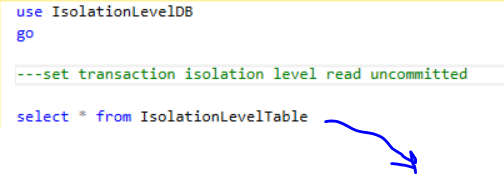
And we should make a new connection and we set read uncommited isolation level.
Then execute select query.

use IsolationLevelDB
go

set transaction isolation level read uncommitted

select * from IsolationLevelTable
Second Connection


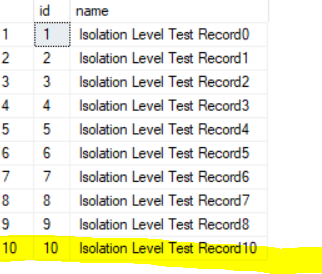
If you look at the query result set, you can see the uncommitted data.


But if you execute rollback command in the first connection screen then you
execute second connection select script again, it brings old record again. 


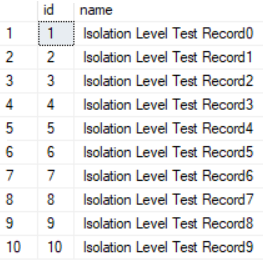
The result set is:


old record


READ COMMITTED


READ COMMITTED is Sql Server’s default isolation level.
If a transaction has made a change but it has no commit, read committed
isolation level doesn't allow another transaction for reading.


Let's do the same plan again. But we must make one change. 


Firstly, open a connection then execute below script: 


use IsolationLevelDB
go

begin tran
update IsolationLevelTable
set name = 'Isolation Level Test Record10' where id=10
First Connection


And then we should execute second script but we must change isolation level to
read committed like below:


use IsolationLevelDB
go

set transaction isolation level read committed

select * from IsolationLevelTable
Second Connection


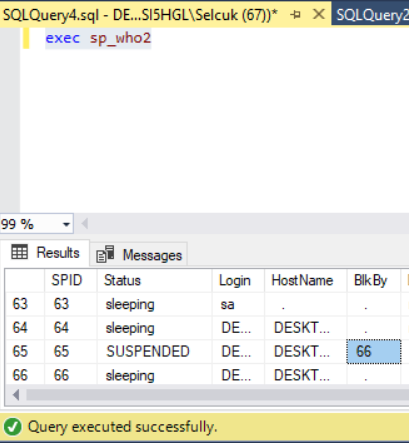
If you notice, there are no results, no messages.
Because second process is being blocked by first process.


If I execute sp_who2 procedure, I can see the blocking.
For this example first process’s session id is 66, second’s session id is 65. 


If you want to finish up the blocking, you can execute rollback or commit command in the
first connection. 


Different Scenario


Let’s execute below scripts step-by-step.


Open first connection:


----  first connection
----- first step in first connection
use IsolationLevelDB;
go

set transaction isolation level read committed

begin tran
select * from [dbo].[IsolationLevelTable]


Open second connection (it is an update script) 


---- second connection 
---- second step

use IsolationLevelDB;
go

update [dbo].[IsolationLevelTable]
set name='Data Changed'
where id=9

---- We could updated record


Then we should turn back to first connection. Firstly we should execute third step.
And we will see that the record was changed.


----  first connection
----  first step in first connection
use IsolationLevelDB;
go

set transaction isolation level read committed

begin tran
select * from [dbo].[IsolationLevelTable]

---- third step

select * from [dbo].[IsolationLevelTable]

---- last step
rollback;

The isolation level READ COMMITTED guarantees only that a transaction will not
read uncommitted data.

Temporary Stored Procedures in Sql Server

Temporary stored procedures are similar to temporary tables. It creates in the tempdb. There are 2 kinds of temp procs: temporary stored pro...